

In a competitive age, large enterprises looking to take up the latest technology advancements to re-engineer their technology infrastructure landscape. It ultimately triggers a need for digital transformation via cloud computing. The demand for cloud computing started in enterprises with:
- Existing complexities and maintenance requirement of their infrastructure set up
- Meeting highest possible service levels for their customers
- Maintaining the right skillset among resources and up-skill requirement as per changing technology landscape
To gain the benefits of Cloud computing, enterprises need to think beyond IT and asked a few questions to themselves as:
- What is the main problem which is hindering their goals?
- Do they have sufficient resources in place to move to the cloud?
- How sensitive is their data and security requisites?
- What is the end-state where they want their systems?
After understanding the requirements, analysis of inherited value prepositions of cloud offering are required. These are:
- Stability
- Flexibility
- Security
- Agility
- Access to innovation with the latest technology stack
Understanding the business requirements and proposed cloud offerings, enterprises need to prepare a road map based on:
- Current Infrastructure and application stack
- Business-critical flows
- Target end-state
Changes at Infrastructure and Application Elements
With these challenges, the next action plan is to understand the infrastructure elements of contemporary architecture, which needs to be changed. An essential impacted component list is as follows.
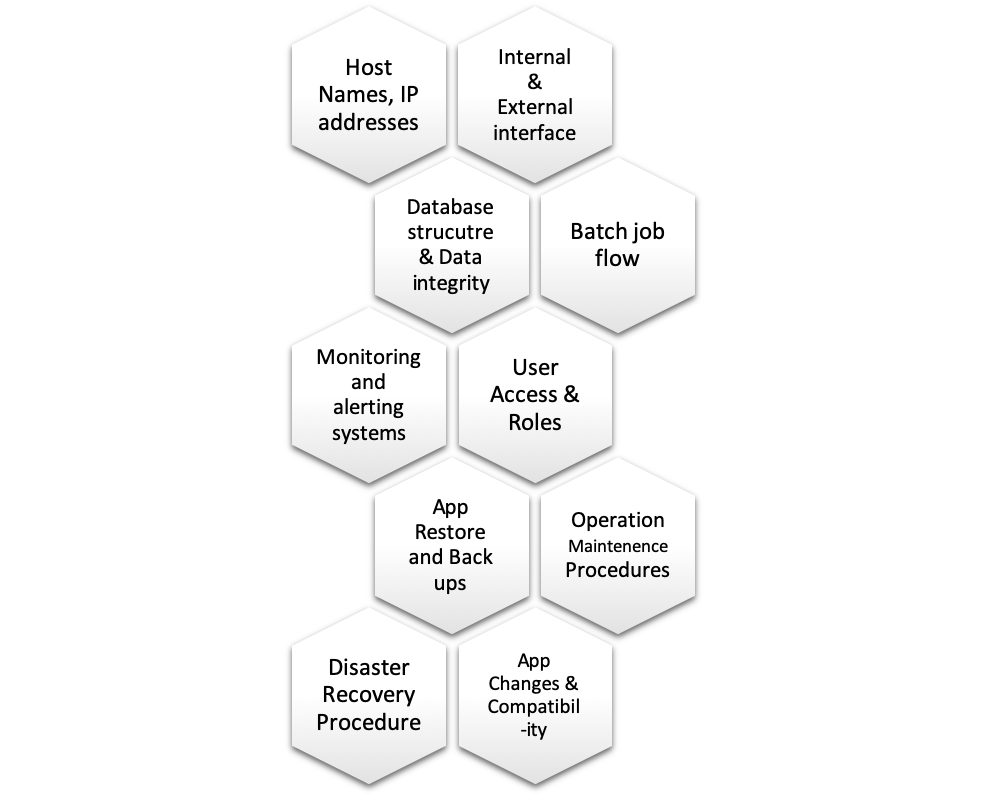
Another critical decision for the enterprise is to find out which application to migrate first, which application to at last and which application should not move to cloud. The choice of the same should come from a thorough analysis of the target IT landscape. This analysis includes:
1. Architectural Criteria
Review the architecture of each application and determine viability for its new platform. Major points to be considered here are:
- Application’s Operating System requirement
- Application’s infrastructure requirement, any external hardware dependency
2. Application-Specific Criteria
Existing applications may develop in a highly compatible (Open Source as Linux O/s) or particular ecosystem. Thus, it is essential to consider the needs of each application from an internal operability perspective. Few important characteristics of the application in this regard:
i) CPU usage
Continuously running application versus ones that spin up and spin down upon completion of the job can significantly change the cost analysis. Thus, the architecture of the application is critical to the cost-effectiveness of using a cloud model.
ii) Latency and throughput requirements
Public clouds can only guarantee certain levels of IOPS and latency requirements due to network bandwidth availability. Bandwidth utilization increases and network links often become oversaturated, which can degrade overall application performance. Furthermore, network architectures, where the traffic routes to a standard gateway in the data centre, cloud-based applications end up travelling a greater distance to reach users when compared to on-premise.
iii) Compute requirements
Computing resources management without CapEx expenditure is the most significant benefit of the cloud. However, applications if required vertical scaling by adding more power (CPU, RAM) to an existing machine, may not be suited for all clouds. Increase of CPU and RAM in a device can be very expansive as well.
iv) Supportability requirements
For on-going support of the application, proper assessment is required both from cloud provider as well as an application owner. Transferrable skills need to explored and planned further.
v) Software licenses and version
The correct version of software licenses needs to be available at the cloud. Sometimes client application is on a lower version of application software whereas cloud contains the latest version of the application. Without proper due diligence of license versions, post-migration applications may have various complications.
3. Business and Industry Criteria
Apart from technology, business depends on various other characteristics which are critical for Enterprise success and should be considered comprehensively. These are:
- Specific backup, HA or business continuity requirements
Private clouds come with application backup features. However, to include all such features may shoot the budget. Storage space is cheap but having alternative High Availability sites, and higher-end business continuity plans could be more expensive in the long run.
2. Compliance specifications or requirements
Data protection laws (HIPAA, SOX, GPRD) and security challenges need to be considered while framing the Cloud migration strategy, including how data is stored, shared and protected. Regular audit of the same should also be considered.
4. Security criteria
While at a high level, cloud environments experience the same threats as on-premise data centres, they also offer a unique set of threats and risks. Those include:
- Consumers have reduced visibility and control
- Immediate self-service functionality makes unauthorized use easier
- Public API’s offer an attractive target to hackers
- Multi-tenancy increases the chance of a surface attack
- Data deletion is unrealistic
- Credentials can more easily be stolen
- Cloud vendors have access to enterprise data
By moving into a public cloud, there will be some compromises on security. Taking a hard look at application and business requirements from this perspective is a crucial step in determining cloud-hosting viability.
Migration
After understanding the components of migration. Next action is to decide on migration. The method of migration can be one of the below methods or a combination of some, they are:
1. Re-hosting – Lift-n-Shift
Every IT organization has a set of a large-scale legacy application that must have continuity maintained but cannot incur the cost, time or effort of refactoring. Re-hosting is essentially a forklift approach to migrating applications to the cloud, mostly moving them without any modification. It is an efficient non-resource-intensive migration process. Often, however, lift-n-shift migrations do not benefit from cloud-native features like elasticity. Moreover, while they may be more cost-effective to run in the cloud than on-premise, it could be even cheaper, whether re-platform or refactor.
2. Re-platforming – Lift-Adjust-n-Shift
Re-platforming can be considered a lightweight or pseudo-refactoring. Instead of rearchitecting the software entirely, it may be possible to optimize or tweaks essential elements of an enterprise application to operate successfully in the cloud. While this path is more glacial than reposting, the approach offers a middle ground between re-hosting and refactoring, allowing workloads to take advantage of native cloud functionality and cost optimization, without the considerable resource commitment enterprise find with refactoring.
3. Refactoring – Redeveloping an application
Rearchitecting or redeveloping an application typically driven by business need to add features, scalability, or performance that would otherwise be difficult to achieve in its current state. This approach is the most time-consuming and resource-intensive but offers the inherent benefits of being able to leverage native-cloud functionality and maximizing operational cost efficiency in the cloud.
4. Repurchasing – Move to a different product
Most enterprise software vendors have or are in the process of creating cloud-based versions of their application. If it makes business sense, this is often a suitable way of getting enterprise application into the cloud.
5. Retiring – Getting rid of the application altogether
In the IT landscape, many legacy products might be able to be replaced or remove without replacement. Once the enterprise has discovered everything in their environment, it becomes a worthwhile exercise to determine if an application is needed, and if not, retire it.
6. Retaining – Keeping the application in its current home
The enterprise should only migrate what makes sense from both a business and technical perspective. If the cost is too high, compliance is too limited, or the complexity makes things impossible in many cases, it may make sense NOT to migrate an application into a cloud. An alternative strategy would be to employ a hybrid cloud model where some of the application (or data) reside on perm but still can leverage the computer and elastics powers of the cloud.
Action Plan – Digital Transformation
After choosing the method of migration, requirements and system specifications, the next step is to plan the action. High-level phases of migration will be:
Phase 1 – Proof of Concept (POC)
Develop, test and document the Migration methods that can be used in the Stretched to Clean Migration. Different migration methods provide different advantages and disadvantages.
Phase 2 – Infrastructure Verification
Deployment, commissioning and testing of the infrastructure that will support the migrated system(s) and any supporting system(s). It will involve:
- Verification of all components with the original designs and integration of these components.
Phase 3 – Discovery
For each database to be migrated, a detailed investigation and information gathering exercise (Discovery) will be performed to allow an informed decision on what “Changes” will be required to meet the Migration Entry Criteria.
Phase 4 – Pre-Production Migration
Perform end to end migration process and validation
Phase 5 – Transformational Testing System Migration
Testing could consist of none to all consisting of the following test stages:
- System Test (ST)
- System Integration Test (SIT)
- Non-Functional Test (NFT)
- Operational or Acceptance Test (OAT)
- Security & Penetration Test
- Disaster Recovery Test (DR)
Phase 6 – Acceptance
Concerned with the after the actual migration event itself and making sure there are adequate test coverage, procedures and process to successfully sign-off the migration.
Cloud Models:
Cloud offers three types of solutions to support the digital transformation, which are:
- Local Cloud/Private Cloud
- Public Cloud
- Hybrid Cloud
Multiple companies are offering public cloud. However, the major among them as per market share is Amazon’s AWS, Microsoft’s Azure and Google Cloud. To choose the best suitable public cloud, enterprises need to investigate the following three categories of Public Cloud Offerings:
- Software As a Service (SAAS): software is owned, delivered and managed remotely by one or more providers. To start, Software-as-a-Service, or SaaS, is a popular way of accessing and paying for software. Instead of installing software on the enterprise’s existing servers, SaaS companies enable enterprises to rent software hosted in the cloud; this is typically the case for a monthly or yearly subscription fee. More and more CRM, marketing, and finance-related tools use SaaS business intelligence (refer hyperlink for more details) and technology, and even Adobe’s Creative Suite has adopted the model.
- Infrastructure As a Service (IAAS): compute resources, complemented by storage and networking capabilities are owned and hosted by providers and available to customers on-demand.
- Platform As a Service (PAAS): the broad collection of application infrastructure (middleware) services. These services include application platform, integration, business process management and database services.
Comparison among AWS vs Azure vs Google Cloud Platform
Differentiator/USPs:
- AWS – the Largest spectrum of Services in place for Enterprises
- Azure – Best Suitable for Hybrid Cloud solution and readymade coding solutions/APIs
- GCP – Innovation and upstart projects for the future with high computing requirements
Costing:
AWS is often among the least-expensive cloud options, but customers may spend more time figuring out what services to buy and how to set them up appropriately. Google offers a trade-off for higher prices for extraordinary amounts of memory and other resources with exclusive discount offers, while Azure offers a more balanced and comprehensive user experience — for often the most amount of money.
- AWS Free Tier: 750 hours (enough for a full month) of Linux or Windows micro instances with 1GB of memory, 15GB of bandwidth, a load balancer, and access to a database, caching, and other tools.
- Microsoft Azure Free Tier: 750 hours of Linux or Windows machines with ample storage, SQL database, 15GB of bandwidth. Several other popular services are free for at least 12 months, and new customers also receive a $200 credit to try any other service for 30 days.
- Google Cloud Platform Free Tier: One month of a micro instance with 30GB of storage, plus a 12-month free trial with $300 credit to try any service. Limited access to many standard tools is provided for free, always.
| Features | AWS | Azure | Google Cloud Platform |
|---|---|---|---|
| Virtual Hardware | Virtual Server and Machines | Virtual Hard Disk as well | Virtual Machines |
| Availability | On-Demand,
Reserved and Spot |
On-demand to Short term commitments – all possibilities | On-demand and sustained use only |
| Charging Patterns | Pay per Hour | Pay per minute | Pay per Minute |
| Application installation | AWS-ECS – for Docker Management | Container service | Container Engine for Docker management |
| Storage Archival | AWS-Glacier | Archive Storage | Cold line |
| Search | Amazon Cloud Search | Azure search | Google inbuilt search engine |
| Analytics | Amazon Kinesis | Azure stream analytics | Cloud data flow and cloud data prepare |
| DevOps/Automation | Ops work and Config | Azure automation | Compound engine management with Puppet and Chef |
| Compliance | AWS Cloud HSM | Azure trust centre | Platform Security |
| Caching | Elastic Cache | Redis Cache | Cloud CDN |
| Processor | In AWS, 128 can be the maximum processor in VM | In Azure, it can be 128 | In the Google cloud, it is only 96. |
| Marketplace | In this, AWS marketplace | Azure Marketplace | G Suite Marketplace |
| App Testing | In AWS, device farm is being used. | In Azure, DevTest labs are being used | Cloud Test lab is being used in this. |
| GIT Repositories | AWS source repositories | Azure source repositories. | Cloud source repositories. |
| Platform as service | Elastic Beanstalk | Cloud Services | Google App Engine |
| Storage of Object | S3 | Block Blob | Cloud Storage |
| Managed data warehouse | Redshift | SQL warehouse | Big Query |
| Kubernetes Management | EKS | Kubernetes service | Kubernetes engine |
| File Storage | EFS | Azure Files | ZFS and Avere |
| Serverless computing | Lambda is being used for serverless computing | In Azure, Azure functions are used. | In google cloud, Cloud functions are used. |
| API management | Amazon API Gateway | Azure API gateway | Cloud endpoints |
| Media services | Amazon Elastic Transcoder | Azure media services | Cloud video intelligence API |






Refer – https://info.flexera.com/SLO-CM-WP-State-of-the-Cloud-2019 for the latest stats on public cloud adaptation…
Comprehensive cloud analysis:.. Can you please refer an industry where the transition happened recently
Great article! I really appreciate the clear and detailed insights you’ve provided on this topic. It’s always refreshing to read content that breaks things down so well, making it easy for readers to grasp even complex ideas. I also found the practical tips you’ve shared to be very helpful. Looking forward to more informative posts like this! Keep up the good work!