

Windows operating system led desktops and laptops are used in various Organizations at the Enterprise level. After a specific tenure, Microsoft keeps on coming with the newer version of Windows and stops support of older versions. Hence, desktop transformation is a cyclic process. To help understand the challenges and workflow, here is a case study of a retail bank desktop transformation which I led as a Project Manager.
By applying the principles of Agile Software delivery, Desktop Transformation Programme (DTP) team helped bake in code quality. As applications and the build used by the Programme were developed for new infrastructure and security setup to ensure more stable and business-aligned outcomes. It took more than a year for the successful delivery of the Programme. In this Case Study, we will go through the challenges faced in delivery and will examine the innovative methods, opted to rescue the Programme.
About the Programme
Workstations of a premier bank in the UK are on the Microsoft operating system, and their Branch servers run on Windows Servers. Microsoft plans to withdraw the custom support arrangement for the Win7 operating system and Server 2008. Hence, the Banking Group has instigated an initiative (the Desktop Transformation Programme (DTP)) to replace all existing Win7 running system instances, and for Branch, the replacement of Server 2008. It includes the application remediation, development, testing and deployment activity required to enable the migration of the existing Branch applications.
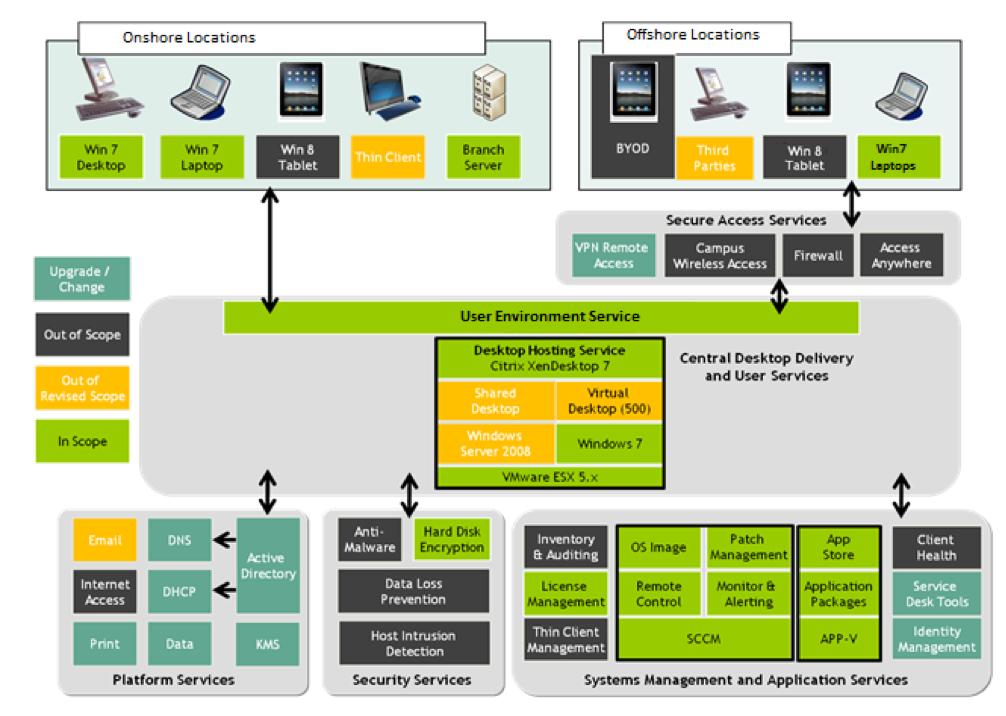
Figure 1
Target Programme Architecture was very complicated, and a high-level block diagram of the end state as in Figure 1. To achieve this end product following objectives were defined.
• Hardware replacement of approximately 40K+ Branch workstations and 30K+ Branch Servers for around 48K+ Onsite users.
• Delivery of the 135+ complex Web and MSI applications. It includes in-house Personal Banking System as well.
• Distribution of a single Desktop solution for a variety of Branch applications/functions.
• Replacement of the existing client/Server deployment tool with Microsoft’s System Centre Configuration Manager systems management product and HP Server Automation Tool.
• Rollout plan across locations in the UK and for a year, so stringent time bound delivery.
Initial Approach:
To plan this high volume Infrastructure and Software change, an iterative phase-based approach was planned and finalised after considering various levels of Code and Hardware Delivery timelines. As per deliverables, each phase is further divided into stages with a fixed outcome. Details of each phase and their respective stages are listed in below chart with the respective testing activities associated with it.
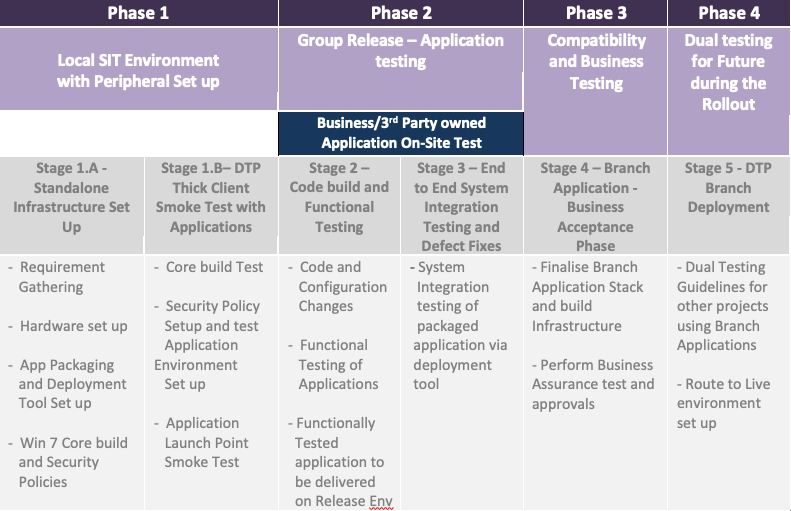
Outcomes of different delivery and testing Stages and issues faced
All stages were dependant on different component, code and hardware deliveries by various Vendors and 3rd Parties which are governed by their own SLAs. Impact of Infrastructure changes on applications was unknown. Due to these dependencies, starting from Stage 1. We have started facing delays in build delivery. Uncertainty around Security Policies and changes required for different Web and MSI applications to run was another blocker to plan the final build. These issues resulted in many open defects at the end of each stage of testing, which was moved to future phases. Hence, the scope of future stages kept on increasing.
Delivery progress in the first three stages is listed below, and SIT (Stage-3) could not take up such a high backlog of defects from these stages in the limited timeframe assigned to it.
| Stage | Planned
Build elements |
Actual Delivery | Blocked Deliverables | Challenges faced |
| Stage 1.A – Standalone Infrastructure Set Up | 230 | 180 | 50 | – Core build components were decided, but their impact on Applications was unknown |
| – Default security policies were applied, and it was agreed that changes would be done after validating application behaviour | ||||
| Stage 1.B– DTP Thick Client Smoke Test with Applications | 512 | 350 | 162 | – Critical Branch apps followed monthly Release Approach for changes in Live so until we aligned to any release for retrofit the changes, the latest version of the application is not available. |
| – End to End remediation was driven by testing output as hardware build components were unknown to the Development team. Hence, there was no requirement or design document to baseline the results. | ||||
| Stage 2 – Code Build and
Functional Testing |
1680 | 800 | 880 | – 7 version old Application code was finalised, which was in Live and stable to do a dry run of the application in a tactical Win7 environment which produced a lot of Environmental issues. |
| – Applications remediation was still in progress, so defect turnaround time was high with a lot of unknown issues | ||||
| – Applications were not packaged yet, and whole dry run was on manual installs |
Stage 3: Start of SIT and the nightmare begins:
Stage 3 – SIT was planned in one of the Release End to End environment of the bank with other projects sharing the Release. We targeted Release-17 initially, but due to design unavailability, we had to move out. After going through several re-planning sessions, we planned for Release -19, which was four months late for initial SIT dates. Since we have reduced the timeframe for SIT and Code fix, it was essential for us to finish the delivery within the Release timeframe from both cost and future Route To Live of Branch application’s perspective.
However even in Release 19, due to high backlog of unresolved defects from previous stages and inclusion of new packaging and deployment mechanism for Win10 – applications, code delivery was delayed by three weeks to its planned schedule.
On the other hand, as testing had started, there were high volumes of high severity defects (>200) raised in the first two weeks with no clear timescale of the fix. Project status moved to Red, and re-planning discussions were started. After having many brain-storming sessions, it was decided that an innovative delivery approach was required from the Cost and Time perspective.
Switch to Agile – A Paradigm Shift in the Programme
“Key constraint and challenge in moving from one approach to the other were that (except Severity 4 defects) all features were effective MUST requirements and so we were bound purely by time constraints in the inclusion or exclusion of features in each sprint.”
To ensure that the IT team achieved the technical and business goals of the development process, an agile methodology was chosen as a way forward for the completion of the Programme. It was a “whole-team” approach to “bake in Quality” to the final Branch product. The delivery happened in real-time, and this approach allowed the Programme team to collaborate actively with the devel¬opment, packaging, testing and support teams. This helped in identifying and transferring issues into executable specifications that guided priorities to coding. Both coding and testing are performed incrementally and iteratively in Sprints (or iterations), building each feature until it delivers enough stability and adds quality to the final product. Key activities to do so were:
• Business, development and QA teams agreed to work very closely with one another. Daily scrum call was set up to track the progress and way forward.
• Development and testing hardware was divided among the respective impacted teams, and more focus was emphasised to deliver and test standalone application changes thoroughly. Security policy and latest build impact on the application were moved into UAT scope with the final build.
• Applications which were installed on Clients were planned to be tested as much as possible by manual intervention until the end step of the script if it was failing to identify as many defects as possible upfront.
• Each month, two sprints were planned to cover dedicated features of the application rather than the whole application itself.
• The business provided eight superscripts which included the most critical business functionalities. These scripts were used as automated regression after every sprint. Successful completion of these was entry a criterion for Business assurance team to be involved in future sprints.
• Branch Workstream Lead acted as Scrum Manager and took up the Sprints and progressed with respective test lead, development and Support teams. A pictorial representation is listed below for this approach in Figure 2.
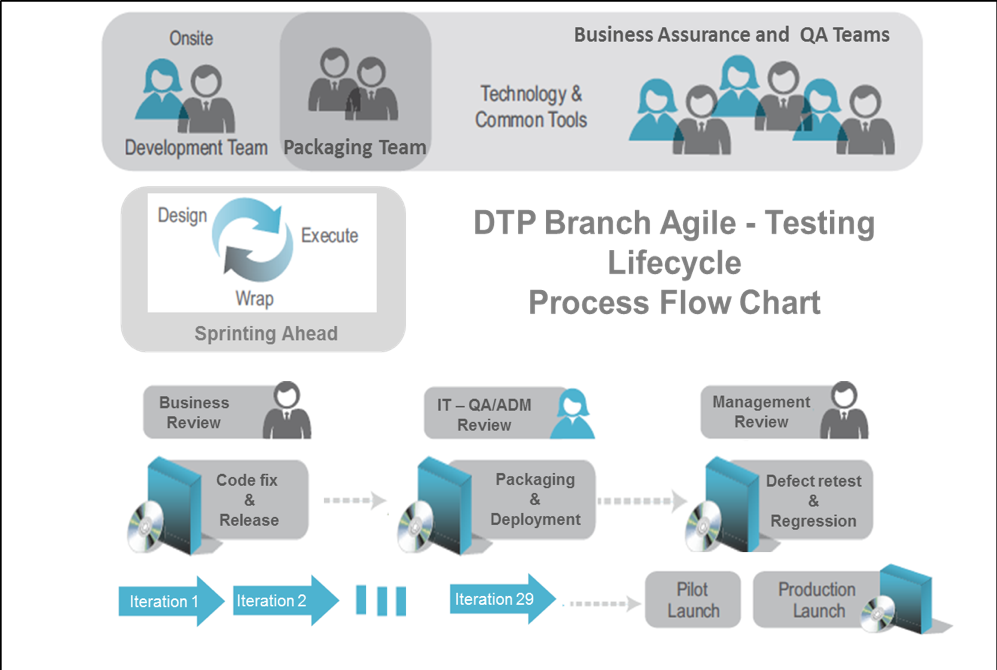
Figure 2
An approach towards each sprint:
• Tackle one issue at a time
• Attack it incrementally
• Treat all requirements as SHOULD rather than MUST for each sprint
• Focussed and to the point testing plan
• Review of whatever is tested
• Integrate different functionality/applications frequently during regression
Best Practices followed:
• Key Success factor was the engagement and buy-in from all delivery stakeholders, including programme Leadership, Development and Business. This approach only works when all teams collaborate.
• Scrum Master and development manager were part of core governance team to plan out each sprint.
• The testing team were also an active contributor to planning and analysis.
• Continuous test feedback mechanism with business and development team is effectively established in daily scrum calls
• Testers work on short iteration activities alongside developers and contribute to user Story improvements.
• Leverage the specialised skills of test-driven development, including unit testing, continuous integration and unit level.
• Leverage automation as a key way to do configuration changes and regression testing. This was done by identifying the respective set of Automation tools for configuration and testing available for respective infrastructure and applications in scope and running a subset of it after each sprint.
Key Advantages of Agile Sprints identified in the project:
• Application requirements were discussed and refined throughout the release (during stand-ups/Scrums), allowing the combined team to address the business/technical aspects of the requirement better. This enabled overall alignment and prevented misunderstandings.
• QA participated in the big-picture require¬ments-writing stage, thus ensuring that testing estimates were not overlooked.
• Automated tools were fully leveraged to implement continuous integration and regression testing, which were required during each sprint.
• Quality became the combined team’s respon¬sibility, rather than just solely that of the testing team. The entire team created a model to agree with the delivery strategies, requirements to cover and defects pri¬oritization for next sprint.
• The end product was achieved with a sustainable process by regular adaptation to changing circumstances.
Agile Effectiveness Analysis:
Effectiveness of any agile testing driven delivery approach is the identification of defects and their turnaround time taken to improve the quality of the end product. When we analysed 1000+ defects that were raised during the programme, it was found that defects which were rose in the earlier cycle, they were either resolved within their SLAs or took very long turnaround time. However, after moving into an agile model, there was a significant improvement in defect turnaround time.
Figure 3 explains the average defect turnaround time for defects raised on a particular date. It is evident that from April to July, defect turnaround time is very long. After applying agile principles, it improved significantly.
While going through below chart, it is to be noted here that due to involvement of third parties for drivers, build components and Common off the Shelf products, defect turnaround time is relatively long in the Programme as a whole, as each third party had their own SLAs defined to fix any issue.
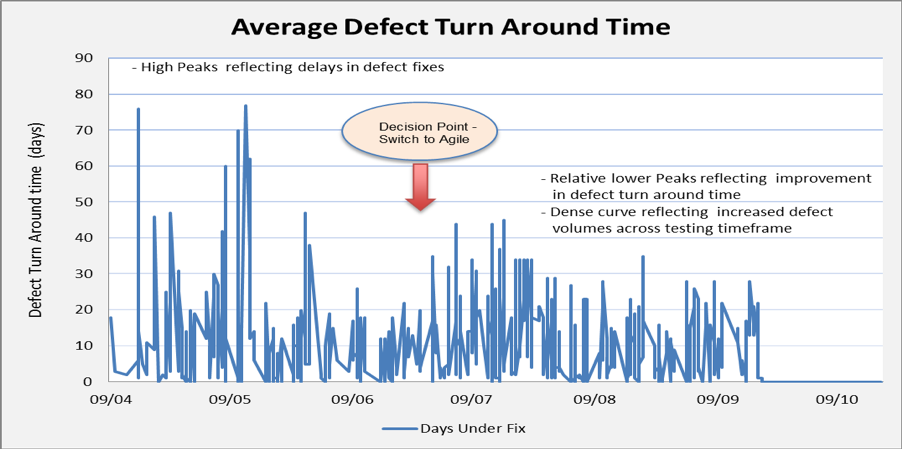
Figure 3
The other observation was around the volume of defects detected and defects closed for each version of the build. Post-version 9 of the build; daily recovery meetings were started, and there was a definite scope assigned to each build rather than whole product delivery. With this focussed approach, there were many functional and building defects identified initially. As the scope was limited to respective features, any corresponding fixes were also identified early and applied in the later releases.
Figure 4 depicts the Defect Raised and Closed volumes for each version of the build. It is to be noted that we had open defects from previous stages related to web applications which were also closed during the builds.
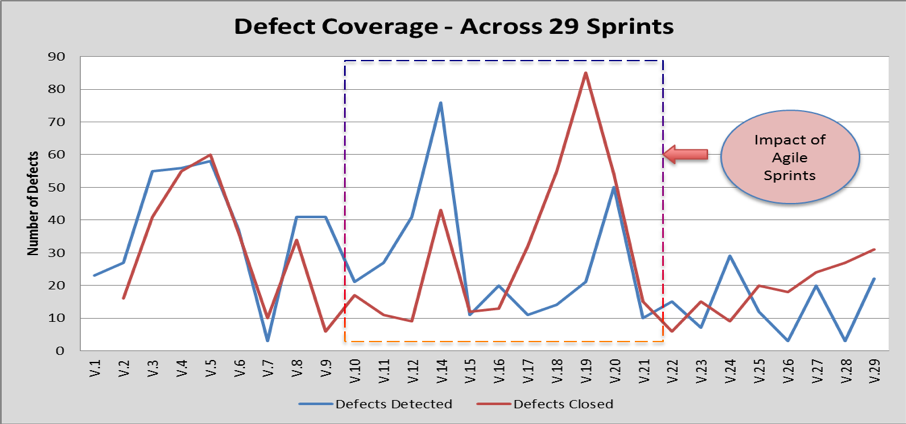
Figure 4
Conclusion
As shown above in figure 4 by version 22, we have a relatively stable build and application stack in place with very few open defects. Hence, SIT was marked as completed after V24. Remaining SIT scripts and defects were moved into Business Assurance and Live & Usability scope for closure. Those phases were completed in the next five versions of the build. By the time of writing this case study, 14 LBG branches were successfully rolled out on Win10, and there are no major Live issues reported to date. This was a wild dream last year which was achieved within Release 19 record timeframe. Now focus is on future Releases to be aligned with other projects for a smooth transition in all LBG Branches.






Recent Comments